 This week, we are going to create a small application that uses the torque wrench test bench that we built a few weeks ago. This application allows users to check the torque applied by the wrench and export the results in CSV format.
The application provides us with an interesting example of how to use our modules, but it also allows us to test the new versions of Microsoft tools. A few months ago, Microsoft released .Net version 10 and Visual Studio 2026.
The code
We code this application in C# with Visual Studio 2026 using the MAUI Framework. When creating the project, we select .Net 10.
Once the project is created, we add the Yoctopuce library as described in our post on the topic. The procedure is identical with Visual Studio 2026, everything works as expected, we haven't detected any changes that would impact the use of our library.
For the code, the first thing to do is to initialize our API using YAPI.RegisterHub. The best place to do this is in the AppShell class.
You need to implement the OnAppearing and OnDisappearing methods of the application as follows:
{
private string url = "";
public AppShell()
{
InitializeComponent();
}
protected override void OnAppearing()
{
base.OnAppearing();
string errmsg = "";
int res = YAPI.RegisterHub("usb", ref errmsg);
if (res != YAPI.SUCCESS) {
string error = "Unable to acces USB port : " + errmsg;
Debug.WriteLine(error);
MainThread.BeginInvokeOnMainThread(async () =>
{
await Task.Delay(1000);
await Shell.Current.DisplayAlert("Error", error, "Quit");
Application.Current.Quit();
});
}
}
protected override void OnDisappearing()
{
base.OnDisappearing();
YAPI.UnregisterHub(url);
}
}
This code calls the RegisterHub and UnregisterHub methods to use the Yoctopuce modules present on the machine's USB ports. If the port is already used by another application (such as VirtualHub), an error message is displayed and the application stops.
Next, we need to implement the application's main page. We start with the OnAppearing method of the page. This method is called when the page is loaded and lists all connected YWeighScale sensors and asks the user which one to use.
{
List<string> res = new List<string>();
YWeighScale scale = YWeighScale.FirstWeighScale();
while (scale != null) {
res.Add(scale.get_hardwareId());
scale = scale.nextWeighScale();
}
return res;
}
protected async override void OnAppearing()
{
base.OnAppearing();
List<string> sensors = GetSensors();
await Task.Delay(500);
string sensor_selected = await DisplayActionSheetAsync("Select WeighScale sensor", "Cancel", null, sensors.ToArray());
Hwid = sensor_selected;
...
}
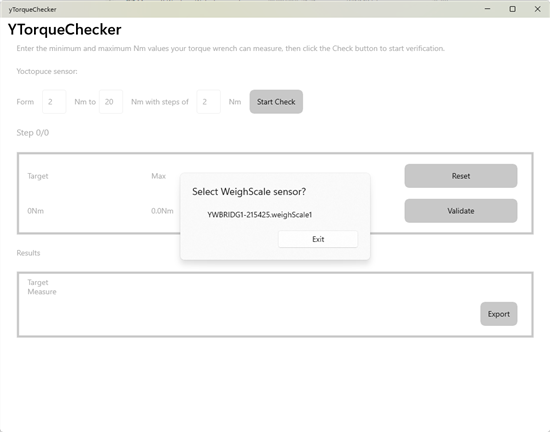
The application lists the available sensors
The rest of the code is mainly XML interface management and does not deserve too much attention.
The only special feature is the use of the Yoctopuce sensor. To have a responsive interface, we use the sensor in callback mode (see our post on the topic). This means that we must periodically call the YAPI.HandleEvents method and register a function that is called when the sensor value changes.
For the YAPI.HandleEvents method, we use an IDispatcherTimer that is programmed to trigger twice per second.
public MainPage()
{
InitializeComponent();
_timer = Application.Current.Dispatcher.CreateTimer();
_timer.Interval = TimeSpan.FromMilliseconds(500);
_timer.Tick += (sender, e) => PeriodicHandler();
...
}
protected async override void OnAppearing()
{
base.OnAppearing();
...
_timer.Start();
}
protected override void OnDisappearing()
{
base.OnDisappearing();
_timer.Stop();
}
private void PeriodicHandler()
{
string errmsg = "";
int err = YAPI.HandleEvents(ref errmsg);
if (err != 0)
{
Trace.WriteLine(errmsg);
}
}
You must register the callback method that must be called by the library when the sensor value changes. To do this, we use the registerValueCallback method of our YWeighScale object.
...
public string Hwid
{
get => _hwid;
set
{
if (value == _hwid)
return;
_hwid = value;
_scale = YWeighScale.FindWeighScale(value);
_scale.registerValueCallback(ValueChangeCallBack);
OnPropertyChanged();
}
}
private void ValueChangeCallBack(YWeighScale func, string value)
{
// update interface with current value
...
}
We have only described the parts of the code that interact with the Yoctopuce library, but the complete source code for this application is available on GitHub: https://github.com/yoctopuce-examples/yTorqueChecker
The application
Once launched, the application starts by asking the user which sensor should be used. The user can then choose the torque range to be tested. For example, perform tests from 2 Nm to 20 Nm with a measure every 2 Nm.
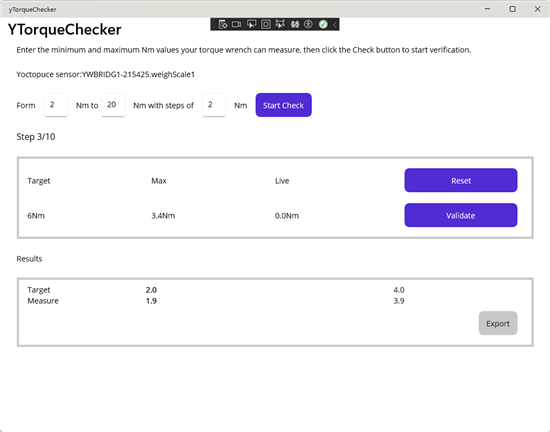
The application
Once the test is launched, a reference torque is displayed. The user must set their wrench to this value and apply this torque to the sensor. The application displays the maximum measured value. The user can either repeat the measure or move on to the next one.
Once all the tests have been performed, the user can export the data to a CSV file.
Conclusion
This application provides a simple method for checking a torque wrench using a Yocto-Bridge. Above all, it illustrates a concrete example which uses Yoctopuce modules with .Net and MAUI.
The complete source code for the application is available on GitHub if you need to adapt it to your needs.