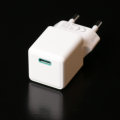
 Now that we've converted all Yoctopuce modules to USB connectivity, we thought we'd test some USB-C chargers to see if there's anything interesting to observe. These chargers are normally sold to let you charge your various USB-C devices, but you can easily use them to power Yoctopuce experiments, especially those controlled by YoctoHubs.
It turns out that with the Yocto-Watt-V2-C, we'll be able to conduct much more precise tests than when we tested USB-A chargers five years ago. So we purchased a substantial number of chargers from a local retailer.
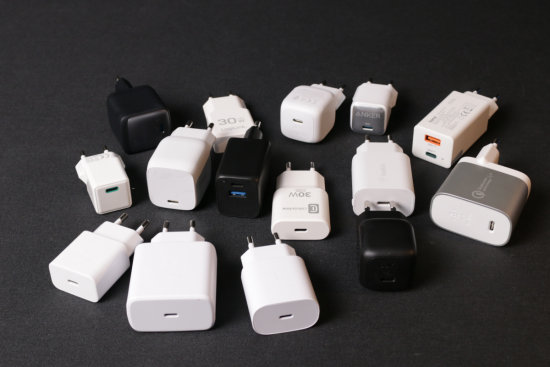
We bought several USB-C chargers
We limited ourselves to the best-known brands so that they would be readily available elsewhere. We focused on models that plug directly into a wall outlet, since we'd observed that chargers available in this format consistently consume very little power when plugged in but not in use, we suspect this is due to some kind of regulation. To provide a point of comparison, we included Belkin's F8J040vf model in the test. It's the USB-A charger that took top honors last time.
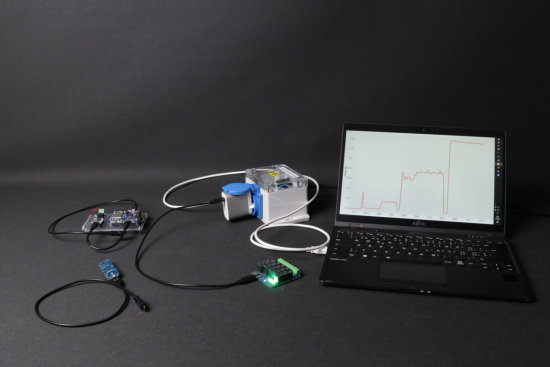
The experiment, the Yocto-Watt-V2-C is in the box
Test protocol
For each charger, we conducted four different tests:
- No load, meaning the charger was plugged in with nothing connected to it.
- The charger powering a Yocto-Meteo, which consumes 0.122 watts.
- The charger powering a YoctoHub-Wireless-n connected to a Yocto-PT100, with an approximate power consumption of 0.64W.
- The charger powering a Yocto-MaxiPowerRelay configured to switch its five relays as soon as it is powered, thereby consuming 1.22W.
The power consumption on the USB bus of the Yocto-Meteo, YoctoHub-Wireless-n, and Yocto-MaxiPowerRelay was measured using a JT-UM120 USB multimeter, a small but quite useful gadget, by the way. Compared to the experiment conducted five years ago, we decided to include the Yocto-Meteo and the Yocto-MaxiPowerRelay because their power consumption is more consistent than that of the YoctoHub-Wireless-n. Furthermore, these three examples provide a good representation of the typical power consumption of Yoctopuce products.
We used Yocto-Visualization configured to display an average reading 12 times per minute. For each charger, we made sure to wait at least a minute after the start of each experiment before taking a measure, allowing some time for the power consumption to stabilize.
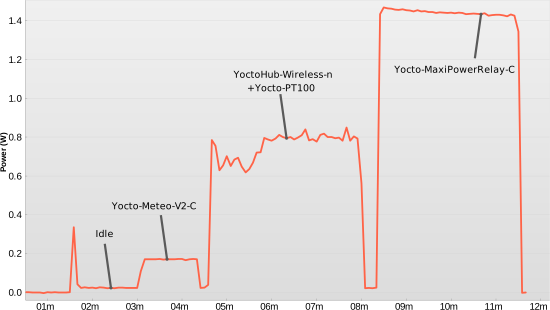
We used Yocto-Visualization to monitor the power consumption of each charger—in this case, the F7U073vf model.
Results
We compiled the results into a small table.
| Tested USB charger | Meteo-V2 | Wi-Fi + Pt100 | Relay
| ||||||
|---|---|---|---|---|---|---|---|---|---|
| Brand | Model | Power | (no load) | W | Eff. | W | Eff. | W | Eff. |
| Samsung | TA800 | 25W | 0.023 | 0.227 | 0.54 | 0.812 | 0.79 | 1.630 | 0.76 |
| Samsung | TA845 | 45W | 0.030 | 0.215 | 0.57 | 0.838 | 0.76 | 1.510 | 0.82 |
| Anker | A2663 | 65W | 0.070 | 0.317 | 0.38 | 0.827 | 0.77 | 1.664 | 0.75 |
| logilink | PA0347 | 30W | 0.067 | 0.249 | 0.49 | 0.801 | 0.80 | 1.604 | 0.77 |
| digitec | DG092BA | 48W | 0.136 | 0.310 | 0.39 | 1.003 | 0.64 | 1.717 | 0.72 |
| Hama | 00201643(C3) | 65W | 0.073 | 0.259 | 0.47 | 0.747 | 0.86 | 1.605 | 0.77 |
| Belkin | WCH001vf | 30W | 0.037 | 0.189 | 0.65 | 0.818 | 0.78 | 1.542 | 0.80 |
| Belkin | WCA004vf V2 | 25W | 0.105 | 0.251 | 0.49 | 0.892 | 0.72 | 1.590 | 0.78 |
| Belkin | F7U073vf | 27W | 0.039 | 0.182 | 0.67 | 0.802 | 0.80 | 1.413 | 0.88 |
| Belkin | WCA013kg | 45W | 0.104 | 0.254 | 0.48 | 0.906 | 0.71 | 1.632 | 0.76 |
| Belkin | WCA013kg | 45W | 0.094 | 0.250 | 0.49 | 0.901 | 0.71 | 1.640 | 0.76 |
| Hama | 0201980 | 20W | 0.037 | 0.223 | 0.55 | 0.911 | 0.70 | 1.649 | 0.75 |
| Samgung | EP-1510 | 15W | 0.051 | 0.211 | 0.58 | 0.867 | 0.74 | 1.560 | 0.79 |
| Cellular Line | VTX-30VG2-02 | 30W | 0.067 | 0.249 | 0.49 | 0.934 | 0.69 | 1.638 | 0.76 |
| Anker | A2637 | 20W | 0.059 | 0.301 | 0.41 | 0.934 | 0.69 | 1.727 | 0.72 |
| Belkin | F8J040vf | 10W | 0.012 | 0.192 | 0.64 | 0.916 | 0.70 | 1.751 | 0.71 |
We can draw a few conclusions from this table:
- All things considered, the model that seems to perform the best is the Belkin F7U073vf.
- There's no point in choosing a power supply that's oversized for your needs; the two 65W power supplies are clearly the least efficient of the bunch.
- If space isn't an issue, avoid these tiny chargers, they're really cute and tempting, but not as efficient as slightly larger chargers.
- We accidentally bought two WCA013kg chargers, one in black and one in white.
An important detail: just because a USB-C charger proudly advertises a power rating of 30, 45, or 65W doesn't mean it can deliver that power under all circumstances. With USB-3, the default voltage on the bus is always 5V, but the standard allows the charger and the connected device to negotiate the operating voltage; this feature is called Power Delivery, often abbreviated as PD. For a given USB-3 charger, the maximum deliverable power often depends on the negotiated voltage. At 5 volts, it's often 15 watts (3 amps), which is still better than what was available with USB-A chargers five years ago.
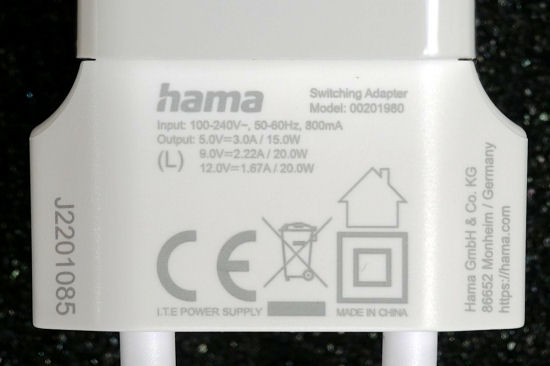
You have to read the (very) fine print
Note that the USB cable can also play a role in the negotiation. Yes, USB cables can now contain electronics, especially if they're rated for more than 15W.
In case you're wondering: no, for now, no Yoctopuce module can take advantage of the Power Delivery feature offered by some USB-C chargers.
Conclusion
As expected, some chargers are better than others, and Belkin really seems to be a good brand. As before, it's all relative: if left idly plugged into an outlet without being used, the difference in power consumption between the best and worst of these chargers amounts to only a few cents per year. There are easier ways to waste electricity needlessly, like overfilling your electric kettle...