 Twelve years ago, we built a DIY project that displayed upcoming events from a Google Calendar on a Yocto-MaxiDisplay that was built into a kitchen cabinet. This week, we're going to update this setup so that it uses our new Yocto-Display-ePaper-C module and shows the events on an ePaper display. We'll also take this opportunity to simplify the code and get rid of the OAuth2 authentication system.
As a reminder, this project uses our HTTP callback mechanism. The Yocto-Display-ePaper-C (or Yocto-MaxiDisplay) module is connected to a YoctoHub-Wireless-n, which periodically connects to a PHP script. It is this PHP script that retrieves upcoming calendar events and updates the display.
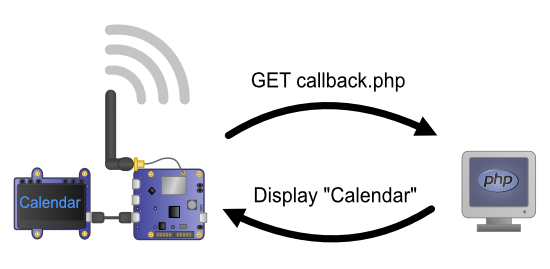
How HTTP callbacks work
The modifications
The old code used the Google API Client library and OAuth2 authentication to access the Google Calendar. This mechanism was relatively compex and not very useful for a small project like this one. From now on, the PHP script uses the secret URL in iCal format. This URL allows us to retrieve all events from a Google Calendar in iCal format.
As a result, we were able to simplify the code. It is no longer necessary to use Composer to install external libraries or to use a database. The settings are stored in a JSON file.
Finally, we made a few minor changes to the code to adapt the layout to ePaper displays.
if ($type == YDisplay::DISPLAYTYPE_MONO) {
$display->set_autoInvertDelay(3600);
$layer0->selectGrayPen(255);
} else {
$layer0->selectGrayPen(0);
}
$h = $display->get_displayHeight();
if ($h > 64) {
$layer0->selectFont("Medium.yfm");
$baseline_height = 16;
$nblines = 8;
} else {
$layer0->selectFont("Small.yfm");
$baseline_height = 8;
$nblines = 5;
}
The get_displayType() method determines whether the display is an OLED display (Yocto-MaxiDisplay) or an ePaper display. Note that, for historical reasons, the constant for OLED displays is called DISPLAYTYPE_MONO and not DISPLAYTYPE_OLED_MONO.
For OLED displays, we enable the autoInvertDelay feature, which periodically inverts all pixels and prevents display burn-in.
We've also taken advantage of the higher resolution of ePaper displays to show three additional lines.
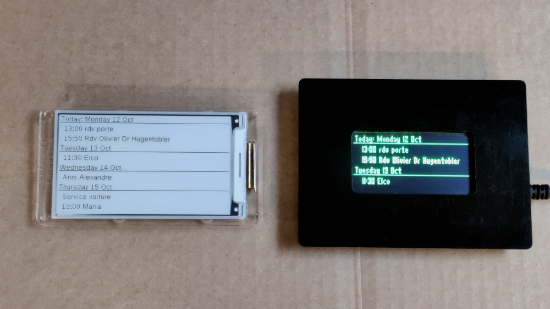
ePaper displays allow us to show more events
Project installation
Installing the project is straightforward: simply upload all project files to the web server.
As a reminder, here is the list of files:
- index.php: The web interface
- callback.php: The HTTP callback code
- common.php: Functions used by the web interface and the callback.
- yoctolib/: The files from our PHP library
Configuration is done directly through the web interface. First, you must register the display's serial number and the calendar's secret URL.
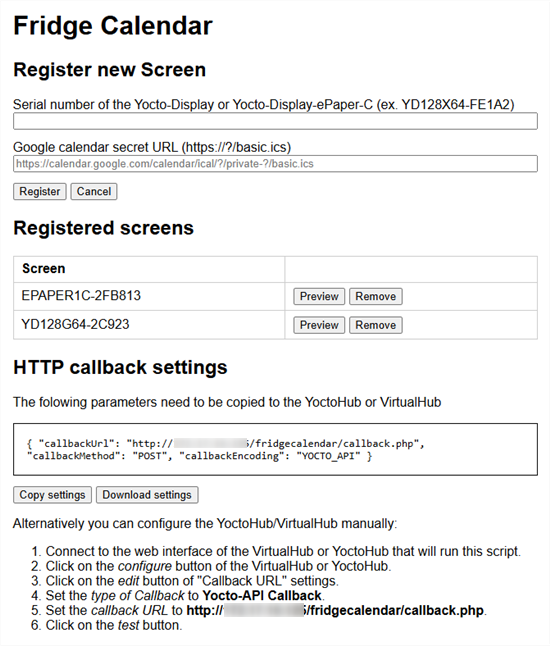
The web interface
To obtain this URL, you must...
- Access your Google Calendar from a web browser
- Click the three dots in the menu of the calendar you want to access.
- Click "Settings and sharing"
- Scroll down to the "Integrate calendar" section.
- Copy the private URL in iCal format.
Note: This unique URL allows you to retrieve your entire calendar, so it's important to keep it private and not share it with strangers.
Once saved, you can preview upcoming events to verify that the URL is correct.
Configuring the YoctoHub
The final step is to configure the YoctoHub's HTTP callback. You can do this manually by configuring a Yocto-API-type callback and entering the URL of the callback.php file, or you can use the "Import" button. In the latter case, click the "Copy settings" button in the PHP script interface and paste these settings into the YoctoHub Import window.
Conclusion
We've updated the GitHub repository for the old project with this new version. This new version simplifies the process of retrieving Google Calendar events and no longer depends on other libraries.
It also demonstrates how easy it is to adapt an application originally designed for a Yocto-MaxiDisplay to work with a Yocto-Display-ePaper-C. The features remain the same; you simply need to adjust the layouts to fit the ePaper display size.
As usual, these projects are not finished applications, but rather examples of how to use the hardware. If you need to use this project for professional purposes, you'll likely need to add an authentication mechanism and possibly a caching mechanism. But for personal use, this is more than enough.