 At the beginning of this year, we reworked the programming interface for controlling Yoctopuce displays in order to make some improvements that we thought would be useful. Here are the new features that you can discover as soon as you next update our programming libraries.
Periodic auto-inversion
One of the known risks of OLED displays is burn-in: dark marks on the screen if the same pattern is left displayed for too long, due to pixel wear. Eventually, pixels that remain almost constantly lit up stop lighting up as clearly as their neighbours.
For a display designed to show the status of a sensor or experiment continuously, this can be problematic. In the case of a monochrome screen, one simple way to avoid the problem altogether is to periodically invert the image: display in black on a solid background rather than in color on a black background. This way, the average activation rate of all pixels remains uniformly close to 50%.
The inversion can naturally be done by the software that draws on the display. But to make your job easier, Yoctopuce displays now include a setting that allows you to activate automatic inversion after a specified period of time:
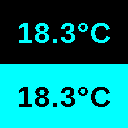
Automatic display inversion
Refresh control
To enable smooth display refresh without flickering, we previously recommended drawing in a non-visible DisplayLayer, then swapping its content once finalized with a visible layer. We now offer a more intuitive alternative, with new primitives that allow you to temporarily suspend and then force the refresh of the display.
Here is an example, first with the old method (still supported):
layer.hide()
...
# draws in the hidden layer
layer.reset()
layer.drawText(64,16,YDisplayLayer.ALIGN.CENTER,'Hello!')
# makes the changes visible
display.swapLayerContent(1,2)
And now with the new refresh control primitives:
...
display.postponeRefresh(500)
layer.reset()
layer.drawText(64,16,YDisplayLayer.ALIGN.CENTER,'Hello!')
display.triggerRefresh()
Arbitrary polygons
Our graphics library did not initially include a primitive for drawing arbitrary solid surfaces. To draw a logo, for example, we suggested using a GIF file copied to the module instead. For cases where you would prefer to use a vector definition, enabling more dynamic effects, we have added support for displaying arbitrary polygons.
layer.polygonAdd(20,15)
layer.polygonAdd(10,20)
layer.polygonEnd()
Like all graphic primitives, this new function can also be used within animations preprogrammed in the module:
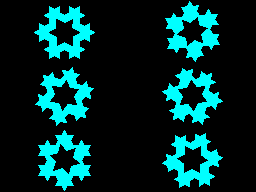
Autonomous animation using the polygon drawing function
Line parameters
We have added a few methods to our library to allow for more precise control over the drawing of shapes: it is now possible to choose the thickness of line strokes, and in the case of solid surfaces, to choose the stroke color independently of the fill color.
Displaying GIF images
Our display modules were already capable of displaying GIF images saved on the module's file system, but with some limitations on the files supported. We have completely rewritten the GIF image decoder to broaden its compatibility, speed up decoding, and add support for transparency in images. In addition, we have added a feature that allows you to display a GIF image sent on the fly by the API, without having to save it to the module's file system first.
How can you take advantage of this?
You can find all these new features in the latest version of the Yoctopuce library (version 2.1.11632 or higher). Don't forget to also update the firmware of your Yoctopuce displays to version 71681 (or higher), since it is the modules themselves that implement all the graphics primitives.