 A while back, the Commission de l'inspection paritaire des entreprises (Joint Labor Inspection Commission) for the Canton of Geneva issued us a formal notice requiring us to implement a system for tracking work hours for all staff. Until now, Yoctopuce had operated on a trust-based system, and that had never caused the slightest problem. But hey, the law is the law, so we had no choice but to comply :( So, since we had to track work hours anyway, we figured we might as well do it the Yoctopuce way :)
Attendance tracking
Before settling on the final idea, we considered several solutions, ranging from the simplest to the most outlandish.
- Our first idea was, naturally, to record arrival and departure times in an Excel spreadsheet. But we quickly realized that for daily use, this solution wasn't very effective.
- We then considered implanting an RFID chip in every employee and installing a large RFID antenna at the entrance... But we weren't sure everyone would be on board.
- We also thought about using employees' cell phones. The idea was simple: as soon as a phone connects to the office Wi-Fi, the employee is considered present. From an ethical standpoint, however, forcing employees to connect their personal phones to the company's Wi-Fi wasn't ideal.
In the end, we decided that the simplest solution was probably to build an actual time clock... using Yoctopuce modules!
A Yoctopuce time clock
We were, of course, inspired by the time clocks available on the market, featuring a card reader and a display. For the card reader, we're using a Yocto-RFID-15693, which can read RFID tags. For the display, we chose a Yocto-Display-ePaper-C paired with an SE2290KS0F1 screen from Pervasive Displays. We also use the buzzer and LED on the Yocto-RFID-15693 to let the user know that their badge has been successfully read. The entire system is controlled remotely via a YoctoHub-Wireless-n. Each employee has an RFID tag containing their first and last name.
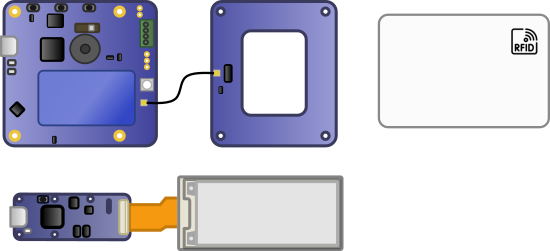
Diagram of the modules used
The enclosure itself consists of two Plexiglas panels cut with a laser cutter, which encase and protect all the modules. The two Plexiglas panels are held in place by spacers.
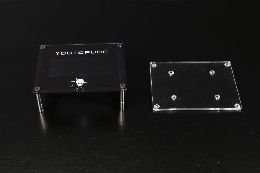
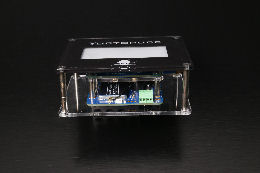
Time clock enclosure
The principle is quite simple: a program runs continuously on a server and processes each employee's arrival and departure when their RFID tag is scanned. It automatically calculates time worked as well as any breaks. For each employee, it creates a file if one does not already exist, then updates it with arrival and departure times, break durations, and the total time worked for each day. It also calculates the total work time for the week and displays all of this on the ePaper screen.
We have also implemented an alert system that triggers when an employee exceeds their daily or weekly work limit: on the ePaper screen, the excess time is displayed in bold on a black background, while the LED flashes purple and the buzzer sounds to signal the alert. Alerts are cleared as soon as the user swipes their card again and is considered to have left. We have also implemented a feature that checks, at the end of the day, whether everyone has clocked out; if not, the day is automatically closed, and a clock-out scan is simulated for users who forgot to clock out.
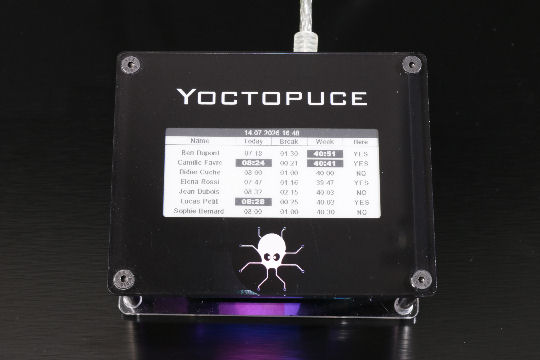
ePaper screen + warning LED
The information is saved in a text file, with one file per employee. Each line corresponds to a workday and contains the various time periods, break time, and total work time. At the end of the week, the program also adds a summary of the total time worked.
06.07.2026 : Jean Dubois - 07:00->12:30/13:30->16:00 / Total 08:30 | Break 01:00 07.07.2026 : Jean Dubois - 08:00->12:15/13:00->16:30 / Total 07:45 | Break 00:45 08.07.2026 : Jean Dubois - 07:55->12:15/12:45->17:00 / Total 08:35 | Break 00:30 09.07.2026 : Jean Dubois - 07:30->11:30/12:30->16:00 / Total 07:30 | Break 01:00 10.07.2026 : Jean Dubois - 07:55->12:00/13:00->17:00 / Total 08:05 | Break 01:00 11.07.2026 : Jean Dubois - Total 00:00 | Break 00:00 12.07.2026 : Jean Dubois - Total 00:00 | Break 00:00 -- Week 06.07 au 12.07 : Total 39:55
The choice of a simple text file may seem surprising, but it offers several advantages: it can be read without any special tools, is easy to save, and is flexible enough for this type of application.
How the program works
The time clock works relatively simply. When a badge is presented to the RFID reader, the program directly reads the first and last names stored in the tag's memory. If this is the first time this employee has been detected since the program started, their history is automatically loaded from the corresponding file.
Once the employee is identified, the program determines whether it is a clock-in or a clock-out. To do this, it simply checks the last recorded clocking: if the last event was a clock-out (or if there are no clock-in yet), a new clock-in is created. Otherwise, the current clocking is simply updated with the clock-out time.
{
List<string> list = rfid.get_tagIdList();
string prenom = rfid.tagReadStr(list[0], 0, 10, options, ref statut).Replace("\0", "").Trim();
string nom = rfid.tagReadStr(list[0], 3, 10, options, ref statut).Replace("\0", "").Trim();
string nomComplet = $"{prenom} {nom}".Trim();
if (!presences.ContainsKey(nomComplet))
{
presences[nomComplet] = PresenceJournaliere.ChargerDepuisFichier(dossierLogs, prenom, nom);
}
var presence = presences[nomComplet];
bool estArrive = presence.DernierEtatEstDepart();
if (estArrive)
{
presence.PointerArrivee();
}
else
{
presence.PointerDepart();
}
}
Each employee is represented by an instance of the DailyAttendance class, which stores all time stamps for the day. Rather than storing work hours and breaks separately, each time stamp is simply represented by a pair (Arrival, Departure). This structure makes it very easy to calculate the time worked by adding up the various work periods, while breaks are automatically deducted from the intervals between a departure and the next arrival.
public string Prenom { get; set; }
public string Nom { get; set; }
public List<(DateTime? Arrivee, DateTime? Depart)> Pointages { get; set; }
public TimeSpan TotalSemaineBase { get; set; }
public PresenceJournaliere(string prenom, string nom)
{
DateDuJour = DateTime.Today;
Prenom = prenom;
Nom = nom;
Pointages = new List<(DateTime?, DateTime?)>();
TotalSemaineBase = TimeSpan.Zero;
}
After each clocking, the employee's file is immediately updated with the new information. The program also recalculates the weekly total so that the data remains consistent at all times, even if the program is stopped and then restarted.
{
string arrivee = p.Arrivee?.ToString("HH:mm") ?? "--:--";
string depart = p.Depart?.ToString("HH:mm") ?? "...";
return $"{arrivee} -> {depart}";
}));
string nouvelleLigne = $"{DateDuJour:dd/MM/yyyy} : {Prenom} {Nom} - {lignePointages}" +
$" / Total {totalTravail:hh\:mm}" +
$" | Pause {(int)totalPause.TotalHours:00}:{totalPause.Minutes:00}";
Finally, the Yocto-RFID-15693's buzzer and LED provide immediate feedback to the user to confirm that their badge has been successfully scanned, while the ePaper display is refreshed to show the updated attendance times for all employees.
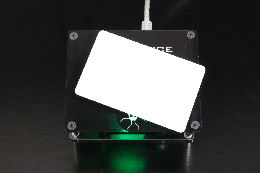
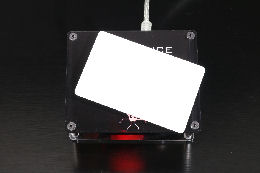
Arrival and departure notifications
Note that the employee doesn't necessarily need a full-fledged RFID badge which they might forget at home half the time. An RFID tag stuck to the back of their phone works just as well.
Conclusion
All in all, our homemade time clock does its job perfectly: simply swiping a badge in front of the Yocto-RFID-15693 is enough to record a clock-in or clock-out, with immediate audible and visual feedback, and a clear display of cumulative hours on the ePaper screen. The entire system fits into a compact enclosure, built entirely with Yoctopuce modules.
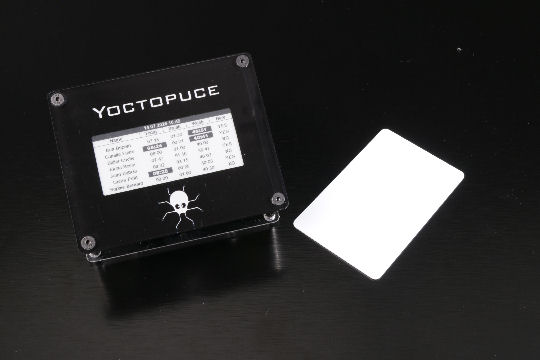
Yoctopuce time clock
And most importantly: our text files, as simple as they may be, contain all the information required by the Joint Labor Inspection Commission: arrival and departure times, break times, and daily and weekly totals, enough to fully satisfy the requirements of this commission, which, incidentally, has never bothered to come see us or even speak to us... But we've stayed true to the Yoctopuce spirit: a simple, transparent, and homemade solution.