 We've already published numerous articles on Home Assistant, and this week we're adding one more, since the latest version of the YoctoHub firmware introduces a new feature: control of the 0-10V, 4-20mA, and PWM outputs on our modules.
As a reminder, the recommended (and simplest) way to use Yoctopuce modules in a Home Assistant setup is via the MQTT protocol, using the "mosquitto" MQTT broker built into Home Assistant. Yoctopuce modules can thus publish the current values from their sensors via MQTT, and Home Assistant can interpret those values. We've actually written a post on this topic.
Once configured, Yoctopuce module sensors appear as Home Assistant entities and can be used in the interface or in automations. However, until now, only the binary outputs of the Yoctopuce modules (the relays and the location beacon) could be controlled from Home Assistant.
We've just released a new firmware (v76945) that removes this limitation: it's now possible to control the modules' 0-10V, 4-20mA, and PWM outputs. This means that the following modules can be controlled directly from Home Assistant:
To use this new feature, simply update the firmware of your YoctoHub. The outputs of these modules automatically appear in Home Assistant as controllable entities. These entities are bidirectional: you can read their status and modify it, both from the interface and from your automations.
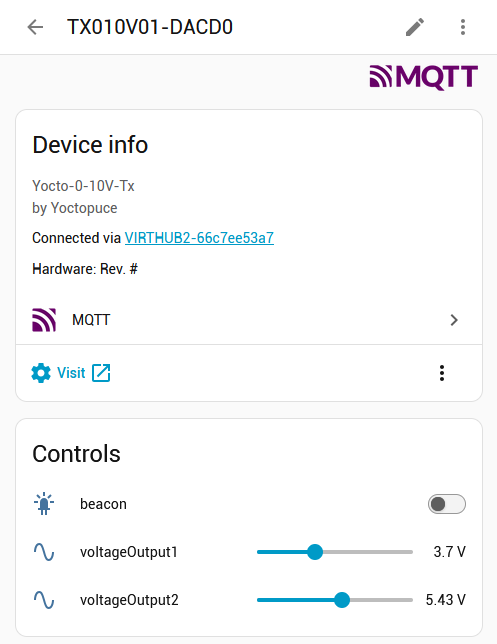
The 0-10V outputs of the Yocto-0-10V-Tx in Home Assistant
Note that, for the Yocto-PWM-TX, you can only control the duty cycle. To change the frequency and other configuration parameters, you must use the YoctoHub web interface.
Warning! For security reasons, YoctoHubs and VirtualHub block commands from the MQTT broker by default. To allow Home Assistant to control your Yoctopuce modules, you must enable the "Allow MQTT clients to control Yoctopuce devices" option, which is located in the HTTP callback configuration.
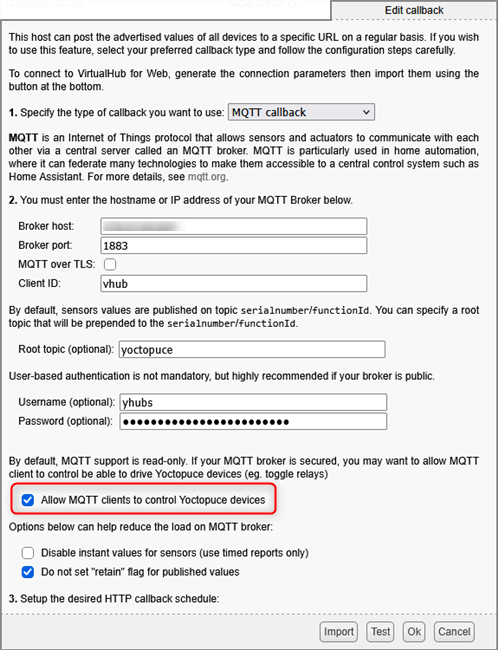
Don't forget to enable incoming commands in the YoctoHub configuration
All you have to do now is update your YoctoHubs to use your analog outputs directly from Home Assistant.