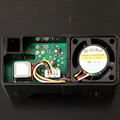
 Sensirion offers a family of sensors designed to measure parameters relevant to assessing indoor air quality in a building. While largely similar, the various SEN6x sensors differ primarily in the air quality standard they are designed to meet and the types of measures they provide. Let's see how to interface them.
The SEN6x sensors are small black rectangular prisms, 55 mm long, with vents on one side to allow air to circulate through the sensor:
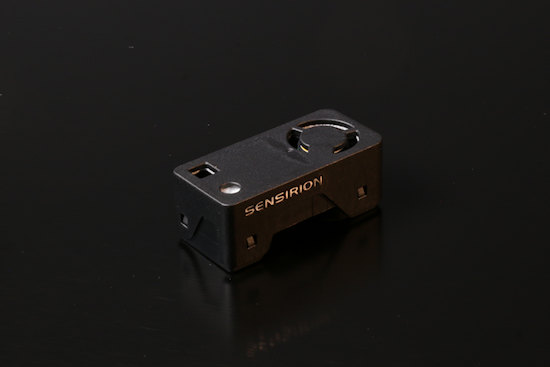
The SEN66 air quality sensor
These sensors are designed to be integrated into the surface of a closed enclosure to ensure the airflow characteristics required for forced convection through the sensor, thanks to the small built-in fan. Sensirion provides a 3D printable model of a mount that allows you to clip the sensor into the recommended position, but you'll need to integrate it into your own enclosure design.
We conducted our tests using a SEN66 sensor, which measures relative humidity, temperature, and CO2 levels, and also provides an estimate of the concentration of fine particles in the air (PM1.0, PM2.5, PM4.0, PM10.0), as well as an air quality index based on VOCs (volatile organic compounds) and NOx (nitrogen oxides). It is one of the most comprehensive sensors in the series; the only measure it lacks is formaldehyde levels, which are only available in the SEN68.
Connecting and communicating with the sensor
The sensor connects via a small 6-pin connector compatible with the JST-GHR-06V, but only 4 wires are needed to provide a 3.3V power supply and I2C communication. To query it, we therefore use a Yocto-I2C connected as follows:
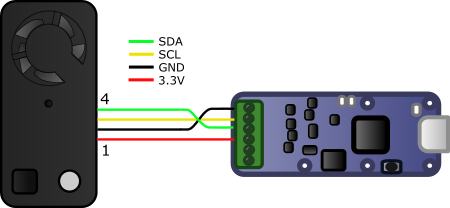
Connecting a SEN6x sensor to a Yocto-I2C
The SEN6x data sheet refers to the NXP specifications for the I2C bus and includes the standard diagrams illustrating the operation of an I2C write and I2C read sequence. One might therefore expect a very standard I2C register query... But this is where things get a little complicated: Sensirion has clearly taken some liberties in implementing this sensor's I2C interface.
First, contrary to what is shown in the data sheet diagram, the sensor does not support the use of a repeated start in an I2C read sequence. If you use it, the sensor always responds with FF. Second, the odd thing about this sensor is the need to add a delay of several milliseconds in the middle of read sequence, immediately after sending the command. Without this delay, the sensor simply ignores the following read request (NACK on the sensor's read address).
We can observe these two behaviors in the Yocto-I2C web UI. The sensor's I2C address is 6B, so the I2C address byte with the direction bit is D6 for a write and D7 for a read. In the interaction below, we started with a query using a repeated start. Then, 8.96 s later, we performed a query without waiting between sending the command and reading, which is therefore ignored by the sensor. Finally, we perform the read sequence in two steps, and it works as expected.
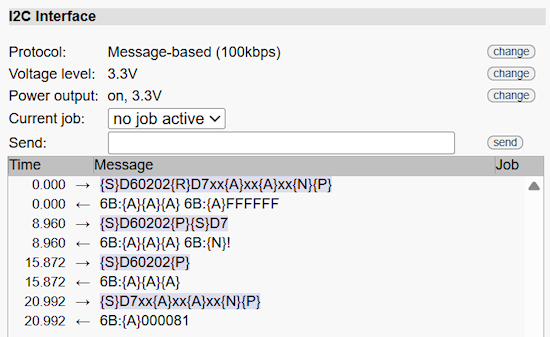
Querying the SEN6x without taking precautions
The required wait time before the read is specified for each command in the data sheet but is generally 20 ms. To accommodate this requirement, the simplest approach is to perform I2C reads as two separate transactions: first sending the address, then performing the read. You then simply need to configure a minimum delay of 20 ms between message transmissions on the Yocto-I2C to work around the problem:
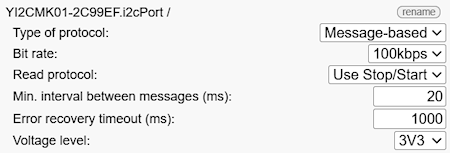
Configuring the Yocto-I2C for SEN6x sensors
Once this issue is resolved, you can proceed with the actual protocol. The sequence of commands to send to obtain measures is as follows:
- D304 to reset the sensor
- 0021 to start measures
- 0202 to ask the sensor if measures are available
- 0300 to read the SEN66 measures
We integrated these commands into an automatic polling job directly on the Yocto-I2C, so that measures are captured periodically, recorded, and immediately made available to the Yoctopuce API. The job consists of two tasks: the first is used to initialize the sensor and is executed only once, while the second runs periodically.
Here is the definition of the initialization task, defined as a custom protocol:
wait 50
writeLine @6B:0021
wait 50
The periodic task is a bit more complex, so we break it down step by step. To query the sensor, as mentioned earlier, the read operation must be performed in two steps: first, send the read address, then, a little later, perform the actual read:
writeLine {S}D7xxxxxx{P}
This first query is used to determine if new measures are available. We therefore check the corresponding byte returned by the sensor so that the task does not proceed further until the condition is met:
assert $ready==1
If measures are available, we issue the main read command, again in two steps. Note that if you are using a SEN63, SEN65, or SEN68, you must use the command variant corresponding to the sensor model and adjust the number of bytes to be received accordingly.
writeLine {S}D7xxxxxxxxxxxxxxxxxxxxxxxxxxxxxxxxxxxxxxxxxxxxxxxxxxxxxx{P}"
Decoding the returned values must skip the CRC bytes, then apply the scaling factors given in the sensor data sheet, before assigning the values to the genericSensor1..9 of the Yocto-I2C:
($hum:WORD)..($temp:WORD)..($voc:WORD)..($nox:WORD)..($co2:WORD)..
compute $1 = ($pm1==0xffff ? -1 : $pm1/10.0)
compute $2 = ($pm2==0xffff ? -1 : $pm2/10.0)
compute $3 = ($pm4==0xffff ? -1 : $pm4/10.0)
compute $4 = ($pm10==0xffff ? -1 : $pm10/10.0)
compute $5 = $hum/100.0
compute $6 = $temp/200.0
compute $7 = ($voc==0x7fff ? -1 : $voc/10.0)
compute $8 = ($nox==0x7fff ? -1 : $nox/10.0)
compute $9 = ($co2==0xffff ? -1 : $co2)
You can download the complete job file if needed.
Result
Once the job is launched, the magic happens, and you can see the Yocto-I2C's genericSensors reflecting the measured values. By launching Yocto-Visualization, you can easily generate a real-time graph of the measures:
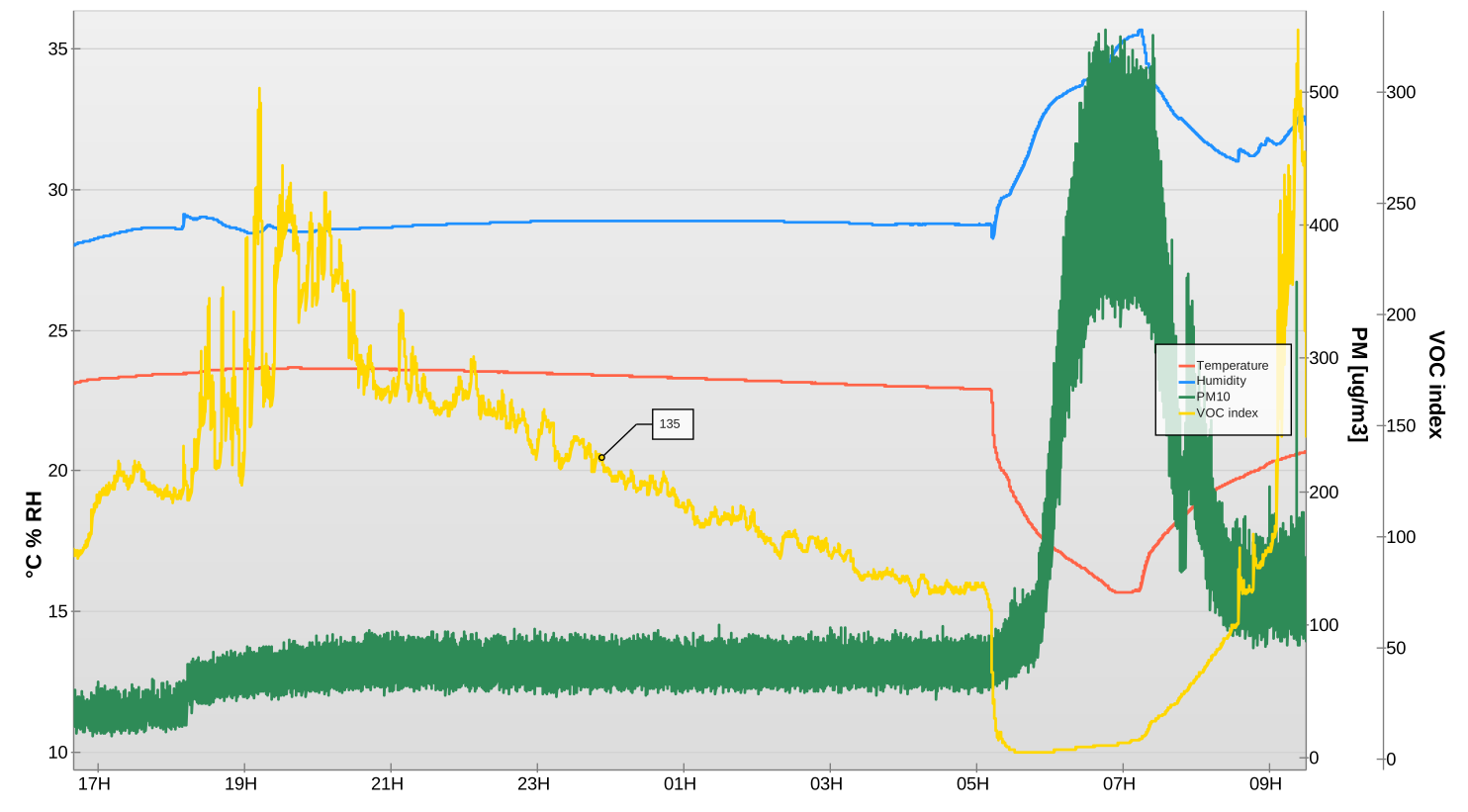
Measures of the SEN66 in Yocto-Visualization
The data is also recorded to the module's flash memory and can be easily read using the Yoctopuce API.
Regarding the reliability of the estimated measures (VOC, NOx, PM), we refer you to the various Sensirion articles concerning the accuracy of these estimates compared to measures taken using scientific instruments. But keep in mind that these are estimates that should be treated with caution.
Conclusion
It never ceases to amaze us to discover such sophisticated sensors using such an unorthodox communication interface. As is often the case, the manufacturer sidesteps the issue by providing a Python implementation of its custom variant of the I2C protocol, but the number of Python packages required to run even the simplest example from the evaluation kit isn't exactly reassuring.
All the better for us, this demonstrates the value of integrating a wide variety of sensors using Yoctopuce products rather than piecing together a multitude of proprietary solutions. Our programming library is efficient, free of external dependencies, and allows you to read all types of sensors from most programming languages. You can even access the sensors over the network without any extra effort, so why not take advantage of it?