This week, we are releasing an update to VirtualHub (for Web), our tool for remotely monitoring a system based on Yoctopuce modules. We've made a few improvements to it. Let's see what they are...
Control of the sensor data logger
The main improvement was made at the request of one of our customers, who uses the local data logger on the sensors' flash memory in parallel with the remote data logger provided by VirtualHub (for Web).
Until now, when accessing the data logger control interface through VirtualHub (for Web), you could only control the data logger provided by VirtualHub (for Web). There was no way to know the status of the local data logger on the sensor's flash memory, nor to activate it remotely. This is now possible, thanks to a dedicated interface.
The section summarizing data logging now distinguishes between local logging and remote logging via VirtualHub (for Web):
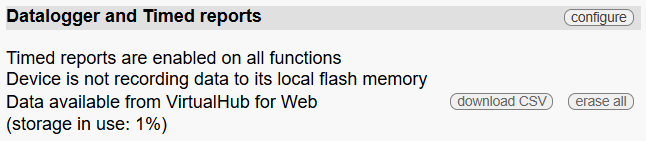
And when you click the configure button, you can remotely control the local data logger on the module's flash memory:
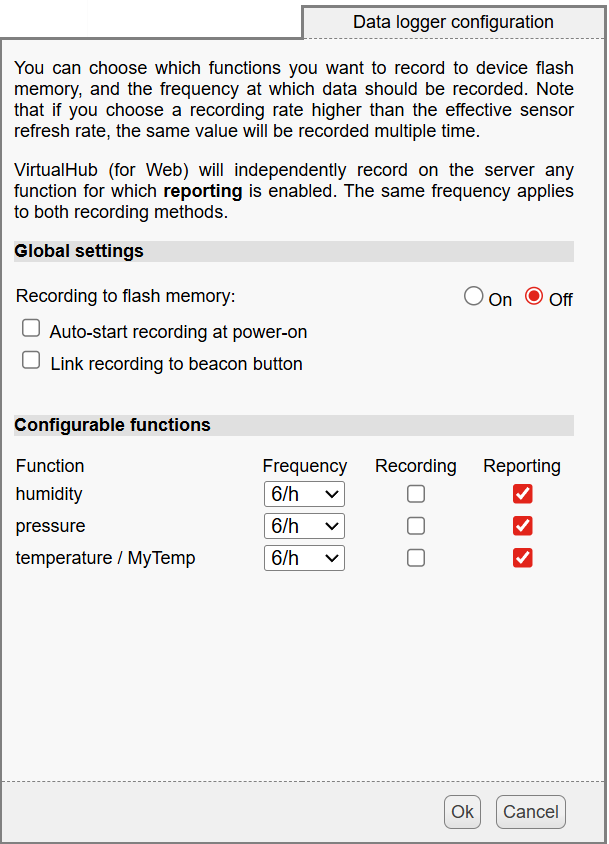
Data logger remote control interface
Controlling Yoctopuce displays
We have found that it is sometimes useful to remotely monitor the status of a Yoctopuce display, particularly to see what is currently being displayed by the application driving it. However, until recently, opening a display's web interface would typically cause a test message to appear on the screen, which interfered with the display. We therefore improved this behavior in the displays' firmware a few months ago, and also optimized the protocol used to send the display's content, allowing it to be transferred much more efficiently for remote monitoring with VirtualHub (for Web).
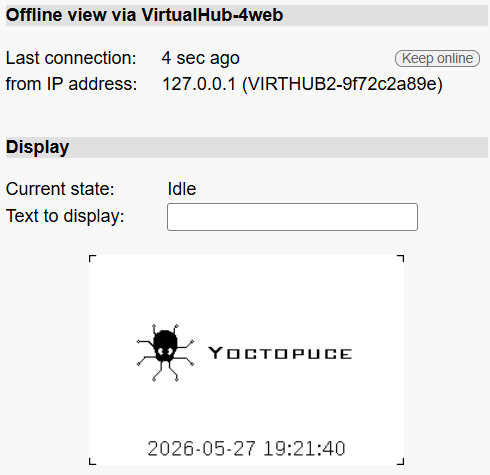
Remote monitoring of a display
Improved file manager
For Yoctopuce modules equipped with a file system, VirtualHub (for Web) allows you to view and modify their contents remotely. We have upgraded the file management user interface to allow drag-and-drop of multiple files and directories, as has been possible for some time already with VirtualHub-V2.
Log loading time
Until now, loading the log window could be very slow when logs were large. This issue has been fixed, and logs should now display very quickly in all cases.
Special characters in passwords
We were informed that using certain symbols in VirtualHub (for Web) passwords, particularly the # character, could cause problems. This has now been fixed. The @ and / characters remain prohibited, but other ASCII symbols should no longer cause any issues.
Conclusion
You can now update VirtualHub (for Web) on your server at your convenience, following the same procedure as for the initial installation. The installer automatically recognizes the existing installation and offers to perform an update.
Please feel free to let us know if you see any other important features that could be added to our tools. Even though we offer them for free, we want to ensure they meet our customers' expectations!