This week, we'll look at how to use a Yocto-RangeFinder to adjust the suspensions on a mountain bike.
Modern mountain bikes are equipped with front and rear suspensions. These suspensions have transformed the sport, enhancing performance and comfort while making even the roughest terrain accessible. But to get the most out of these suspensions, it's essential to adjust them to your weight and riding style.
The first adjustment to make, and the most important one, is SAG. SAG comes directly from the verb to sag. It measures the percentage of suspension compression when the rider gets on the bike. Most modern bikes are designed to operate with a SAG between 25% and 30%.
In theory, this measure is very simple to take: have the rider mount the bike and measure in millimeters how much the fork and shock compress. By dividing this value by the travel of the fork or shock, you get the SAG expressed as a percentage. In practice, this is time-consuming and tedious.
The traditional method involves using an O-Ring that is pushed against the sliding part while the rider is on the bike; you must then get off the bike without moving the suspension, and finally measure the distance between the O-Ring and the sliding part to obtain the compression in mm. From there, you calculate the SAG as a percentage. If the value is within the desired range, great. If not, you adjust the air pressure or the fork spring and repeat the measure.
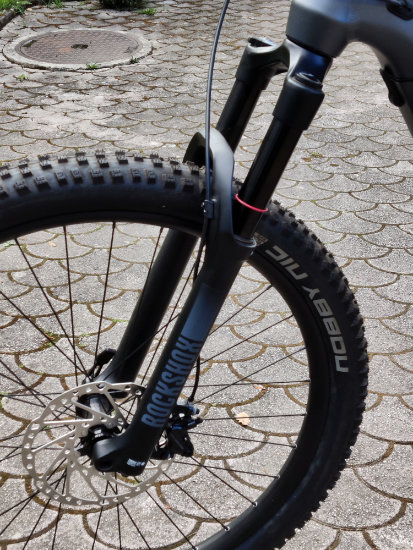
The traditional method
As you can imagine, this takes a long time. Furthermore, you need two people to perform this measure correctly: the rider on the bike and a second person who holds the bike and moves the O-Ring. You have to be careful to get off the bike without compressing the suspension. There's also the case where there's no O-ring on the fork or shock absorber. In short, it's a hassle.
The Yoctopuce version
The idea is to use a Yocto-RangeFinder to measure suspension compression. This module works by emitting a pulsed infrared laser beam and measuring the reflection time off the first object it encounters.
The idea is to 3D-print two supports that can be quickly attached to the bike's fork or shock absorber. The Yocto-RangeFinder is mounted on one of the supports. The other support is a simple plate that acts as a reflector for the laser.
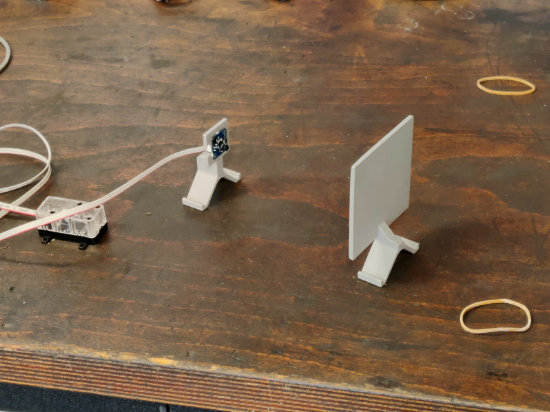
The supports
To install this system, you only need to attach one support to a fixed part of the suspension and the other one to the moving part. Naturally, you must align the two supports so that the laser of the Yocto-RangeFinder points at the "target" support.
You don't need to mount these supports at a specific height, since you'll simply be measuring the difference between the suspension's position when empty and its position with the rider. However, you must position them where the supports won't hit the frame, which can be tricky on some frames.
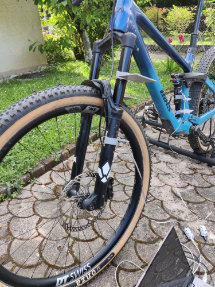
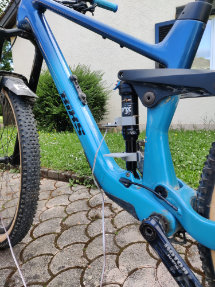
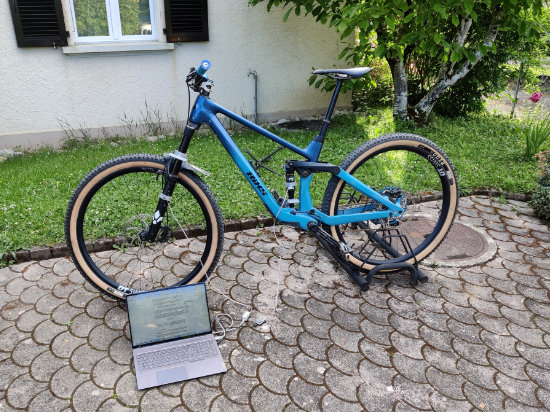
Assembly example
All 3D models of the supports we used are available at this address.
The Yocto-RangeFinder
You've probably noticed that we've separated the sensor part of the Yocto-RangeFinder module. As with most of our sensors, you can cut the board in half and mount the sensor part separately. In our case, we used a Picoflex-U100 cable, which allows for a more compact mount and, above all, a smaller footprint. Additionally, the Picoflex cable is much more flexible than a standard USB cable, which makes installation easier.
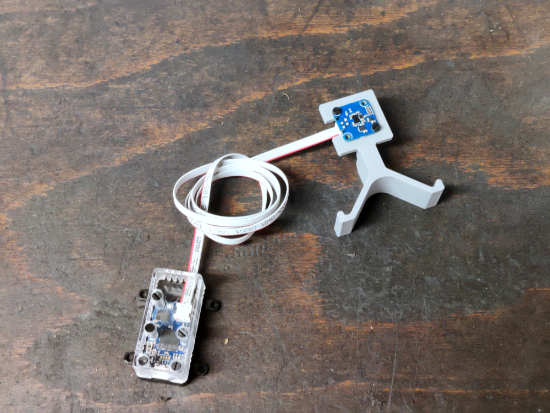
Moving the sensor away using Picoflex connectors
The code
To test this system, we wrote a small Python program that takes as an argument the maximum deflection of the suspension element we want to adjust.
This program checks if a Yocto-RangeFinder is connected to the USB port. It configures it in HIGH_ACCURACY mode and registers a callback that is called whenever the measure changes.
In this callback, we calculate the current SAG using the largest measure as the reference value (0% SAG). The rest is a simple rule of three to calculate the SAG.
def __init__(self, travel, max_val):
self.travel = int(travel)
self.max_val = int(max_val)
self.sag = 0
def update(self, new_val):
# updates max value in case the application was started
# with the suspension compressed
if new_val > self.max_val:
self.max_val = new_val
mm_sag = self.max_val - new_val
sag = mm_sag * 100 // self.travel
if sag != self.sag:
self.sag = sag
msg = "SAG = %d%% (%dmm)" % (self.sag, mm_sag)
print(msg, end="\r")
As always, the complete code for this little program is available on GitHub, and you're free to use it as you see fit.
To be continued...
We've mainly discussed the concept and use of the Yocto-RangeFinder and the support system, but in an upcoming post, we'll improve the software side of things. We've been wanting to test an SDK for a while now, and this project seems perfect for it.
So we'll reuse this setup in an upcoming post.