 Do you remember the Grocery List 2.0 - that little barcode scanner paired with a receipt printer that let you create your shopping list by scanning the items you needed to buy and then print it out right before heading out to the store? Believe it or not, 10 years later, I'm still using this system and am completely satisfied with it - well, almost...
While the scanner part is still in use, the printer part has finally been abandoned: like all rechargeable gadgets, it would regularly run out of battery just when most needed. Hence the need to copy the shopping list onto a piece of paper right before heading out to the store, which quickly became a habit.
But now that Yoctopuce has the Yocto-Display-ePaper-C in its product range, couldn't we replace that scrap of paper with an ePaper display and take advantage of the fact that an ePaper display doesn't need electricity to maintain its image?
The mechanical part
The idea is to build an easily portable device, about the size of a (very) small smartphone, consisting of the display and the Yocto-Display-ePaper-C. When not in use, this display is connected to a docking station that contains a YoctoHub-Ethernet, which is responsible for updating the display as items are added to the shopping list.
The display
The display is simply based on the ePaper-3.7-BW product, which consists of an E2370KS0C1 ePaper screen glued to an acrylic glass plate, to the back of which a Yocto-Display-ePaper-C can be screwed. The whole assembly is encased in a 3D-printed plastic shell. On the back of this shell is a dovetail slot that allows the device to be precisely positioned on its docking station. The entire assembly is held together with screws and threaded inserts
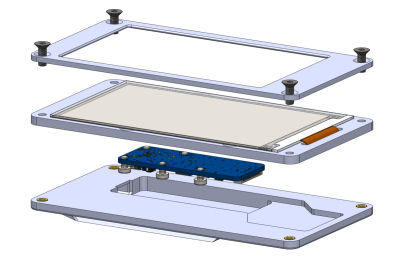
The display design
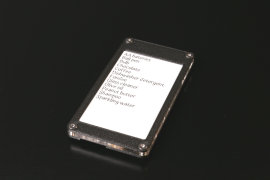
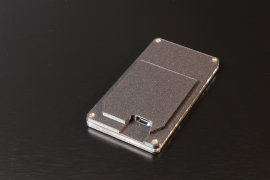
The same thing, in real life
The docking station
The docking station is a simple 3D-printed plastic box that houses a PoE YoctoHub-Ethernet, with a slot on the lid that aligns with the back of the display. The little trick that makes all of this work together seamlessly is a part not manufactured by Yoctopuce but by Adafruit Industries. It's a simple male USB Type-C connector soldered onto a breakout board. The back of the display and the docking station are designed so that the connector on the Yocto-Display-ePaper-C and the one on the breakout board align and snap together when you slide the display onto the docking station. The breakout board and the YoctoHub are connected by a 1.27-1.27-11 cable, one end of which has been cut and then soldered to the contacts on the breakout board.
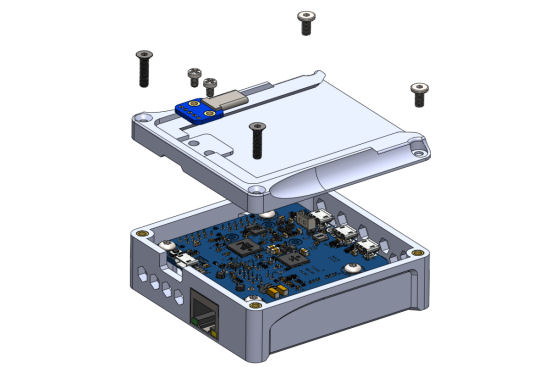
The docking station design
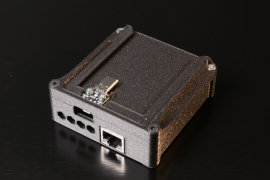
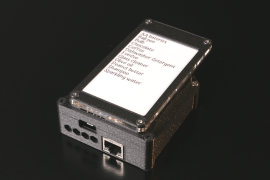
The same thing, in real life
If you're interested, you can find the STEP files for the display and the docking station in this ZIP archive.
The software part
The programming is fairly straightforward: The shopping list works with HTTP callbacks. The YoctoHubs for the scanner and printer simply call PHP scripts located on a web server at regular intervals, and the output of these scripts controls the various modules connected to the YoctoHubs. The shopping list is also stored on the server as an .ini file. All it took was writing a small additional PHP script that reads this .ini file and sends the necessary commands to "print" the list's contents on the display, and then configuring the base's YoctoHub-Ethernet to call this script at regular intervals.
$errmsg="";
if (yRegisterHub("callback", $errmsg) != YAPI_SUCCESS)
{ die ("API init failed: $errmsg"); }
$display = yFirstDisplay();
if (is_null($display)) { die ("No display found");}
// loads the list
if (file_exists("data/$feed.ini"))
{$list=parse_ini_file ("data/$feed.ini",true);}
else
{die ("No such feed ($feed.ini).");}
uasort($list,function($a,$b){return strcasecmp($a['desc'],$b['desc']);});
// init display
$l0 = $display->get_displayLayer(0);
$w = $display->get_displayWidth();
$h = $display->get_displayHeight();
$y = 3;
$x = 5;
$items = [];
// check for list items we need to buy
foreach ($list as $ean=>$data)
{ if ($data['mustbuy']>0) $items[] = $data['desc'];}
// find out the best font depending on items count
$fontIndex = sizeof($AvailableFonts)-1;
while (($fontIndex>0) && (sizeof($items) * $AvailableFonts[$fontIndex][1]>$h))
{ $fontIndex--; }
$l0->selectFont($AvailableFonts[$fontIndex][0]);
$lineHeight = $AvailableFonts[$fontIndex][1];
// start display refresh
$display->postponeRefresh(1000);
$l0->clear();
if (sizeof($items)>0)
{ for ($i=0;$i<sizeof($items);$i++)
{ $l0->drawText($x,$y, Y_ALIGN_TOP_LEFT,$items[$i] );
$y += $lineHeight ;
if ($y>$h-$lineHeight) {$y=3;$x=$w>>1;} // starts a second column
}
}
else
{ $l0->drawText($w>>1,$h>>1,Y_ALIGN_CENTER,"NOTHING TO BUY" ); }
$display->triggerRefresh();
We've added a few nice touches, such as a pretty handwritten-style font available in three sizes, so the screen uses larger or smaller characters depending on the number of items to display, but overall, this script doesn't do anything extraordinary.
Conclusion
This mobile electronic list system might seem like a fun - albeit somewhat redundant - gadget, but in fact, it's remarkably effective: the same system is already used internally at Yoctopuce to create lists of products, along with their locations, that we must retrieve from the stock based on orders to be filled.
We imagine some people might think they could do just as well with a simple smartphone and a free app. Maybe, but our mobile electronic list doesn't need batteries; if the screen breaks or gets lost, we can easily make another one at little cost, and we don't run the risk of having the contents of our lists shared with third parties without our consent.
To end on a lighter note, someone pointed out that we can't cross off items from the list as we complete them, like on a real paper list. Actually, you can: just use a dry-erase marker - we tried it, and it works :-)