 This week, Yoctopuce is introducing a new module that's been close to our hearts for quite some time. It's a small driver for ePaper displays, with all the little perks you'd expect from a Yoctopuce display. Let's take a closer look, shall we?
ePaper Technology
Why?
The biggest advantage of ePaper technology is that the displays are persistent: they retain their image even when they're no longer powered. In an ecosystem where modules can enter into a deep sleep mode to save energy, this is particularly interesting: it becomes possible to build a system that wakes up from time to time, takes a few measures, calculates a couple of things, displays the result on the display, and then goes back to sleep. All of this with a ridiculously low average power consumption.
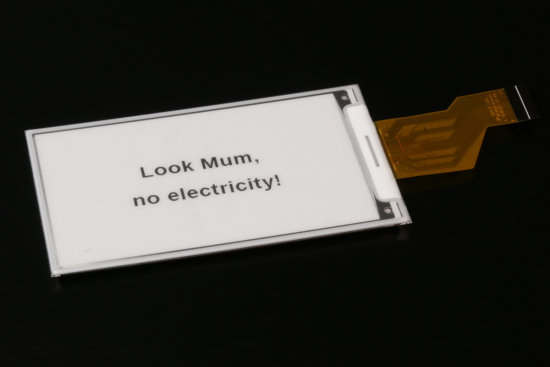
An ePaper display retains its image even when it is not powered
These are also purely reflective displays; they reflect the light shining on them in the same way as printed paper, hence their name. They look magnificent in direct sunlight; however, they're unreadable in the dark and can't be backlit, and that's not all...
Disadvantages
Since there's nothing truly magical in this world, this miraculous persistence of image comes at a fairly heavy cost. Most ePaper displays are black and white and take, at best, half a second to refresh. There are also some pretty spectacular color ePaper displays, but the number of colors is very limited, and refreshing the image can easily take several tens of seconds. Suffice it to say that interactive applications are somewhat limited; don't expect to play Space Invaders on one.
The Yocto-Display-ePaper-C
The Yocto-Display-ePaper-C is a new, single-width module that's 50 mm long; it has a USB-C connector and is relatively flat, which allows it to be installed, for example, behind the display without taking up an excessive amount of space.
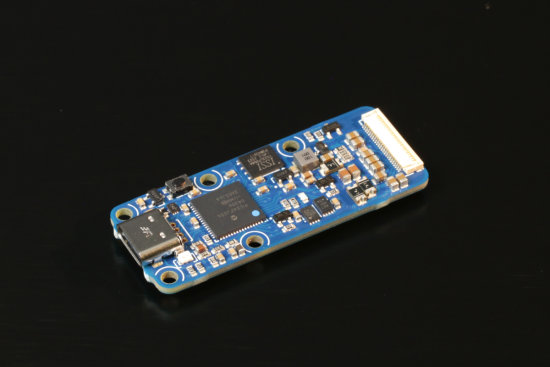
The brand new Yocto-Display-ePaper-C
Unlike the Yoctopuce OLED displays, which are sold as a complete unit (electronics + display), the Yocto-Display-ePaper-C is just a driver sold separately. Why? Simply because Yoctopuce has ensured that it's compatible with most displays of the brand Pervasible Displays. So you can choose whichever display model you want to use. You'll find a complete list of all the displays that have been tested in the documentation, but as a general rule:
- The display must be smaller than 5 inches, this is a power supply issue.
- The total number of pixels must be less than or equal to 130,560 for black-and-white displays and 65,280 for color versions, this is due to the module's on-board memory capacity.
To make it easy for you to connect your ePaper display, the Yocto-Display-ePaper-C is equipped with a small ZIF connector. We chose a model that's very easy to use: lift the latch, gently insert the display ribbon cable, and close the latch. Once the display is connected, you'll need to configure the module to specify the display model you've chosen. We would have liked for the detection to happen automatically, but after discussing this with Pervasive Displays support, it turns out that it's not possible.
Full refresh vs. fast refresh
Normally, ePaper displays refresh by flickering several times. The process typically takes a few seconds; this is what Pervasive Displays calls "full refresh". In addition to being slow, it's quite unpleasant to watch. However, some of the brand's displays also offer an alternative method called "fast refresh", which doesn't flicker and generally takes a little less than a second, though this may result in the appearance of slight artifacts.
Which display model should you choose?
If black-and-white is sufficient for your needs, we recommend choosing an E2xxxKSxxx model. These are the latest models; they officially support fast refresh and have a relatively wide operating temperature range. If you want to enjoy the vibrant reds and yellows of color displays, and you can afford to wait until the user has their back turned to perform updates, choose an E2xxxQSxxx model.
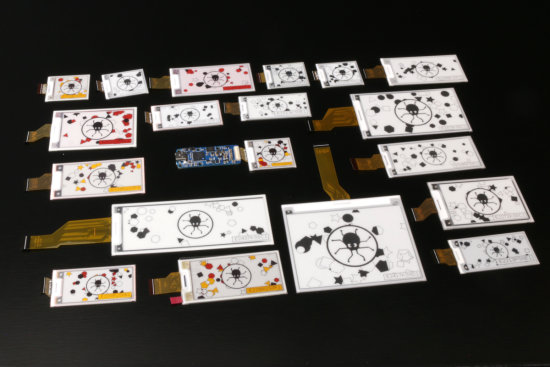
The Yocto-Display-ePaper-C is compatible with many displays
Pay close attention to the length of each display model's ribbon cable: some are so short that they won't allow you to mount the Yocto-Display-ePaper-C on a plane other than that of the display.
The API
The Yocto-Display-ePaper-C works exactly like our OLED displays: you have access to numerous graphic primitives; you can display text, define your own fonts, and use double buffering, all of that in the orientation of your choice. Standalone animations are supported, but are barely usable even with the fastest displays. All calculations are performed by the module itself, not by the API; so if you're a purist who feels you don't need an API, that will work too.
The concept of layers has been retained, but their number is limited by the amount of memory they occupy in the module: the larger the display, the fewer layers you have available, to the point where the largest displays have only one. If you're used to working with Yoctopuce displays, you might be wondering how to perform double buffering when you only have one layer. This has been addressed: the API now includes a command that allows you to temporarily disable automatic display refresh. You can stop the refresh, take your time building the content of your image, and then reactivate the refresh. This way, you can update your display all at once without flickering.
Accessories
Yoctopuce can't really afford to stock and resell the entire range of Pervasive Displays ePaper displays. But since we wouldn't want you to end up with a module and no display to play with, we've selected a few of the most interesting ones and sell them along with a plastic plate with mounting holes, onto which you can stick your display on one side and screw the Yocto-Display-ePaper-C on the other.
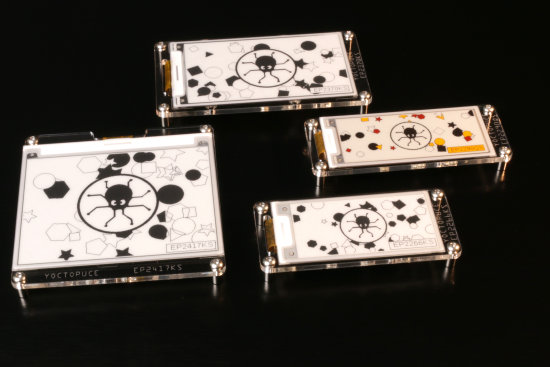
Yoctopuce sells a few displays that come with a mounting plate
Conclusion
We hope you'll enjoy this display driver as much as we do: here at Yoctopuce, it's not every day that, as soon as a module prototype is finished, everyone rushes to volunteer to test it in their own personal projects.
Finally, we should mention that the raster display portion of the Yocto-Display-ePaper-C is very loosely based on the raster driver code published under the "Attribution-ShareAlike 4.0 International (CC BY-SA 4.0)" by Pervasive Displays on their GitHub page. Yoctopuce has therefore followed suit and published, under the same license, its own version of the code that configures a Pervasive Displays display, takes a bitmap, and transmits it to the display's COG.