 From day one, the Yoctopuce documentation has emphasized that the Yoctopuce API for a module and its features are intentionally decoupled, to the point where you can work with Yoctopuce features without having to worry about the module that hosts them. In other words, you don't need to look for a specific module to use any of its features. In fact, it's actually not recommended...
With the arrival of Yoctopuce USB-C devices, we've started receiving emails from customers who are a bit surprised to find that the USB Type-C module they bought to replace an old Micro-B module doesn't work with their application, even though we had promised that the USB-C and Micro-B versions would be compatible.
The problem
Every time, if we take a closer look at their code, we immediately notice that it is locked in one way or another to a specific name or model identifier. You see, although functionally identical, the USB-C and Micro-B versions of each module have different names and model identifiers. This is, among other things, what allows you to tell them apart when you buy them...
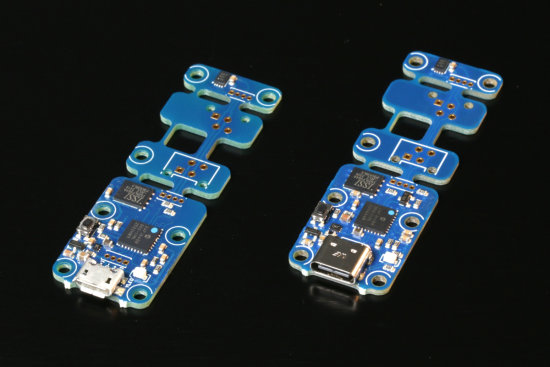
These two Yocto-Temperature are 100% compatibles, but they do not share the same name
Let's look at a quick practical example: imagine you have a simple Yocto-Temperature module used to measure the ambient temperature. You might intuitively be tempted to write your temperature monitoring code this way:
module: YModule = YModule.FirstModule()
while not (module is None):
if module.get_productId() == "TMPSENS1":
serial: str = module.get_serialNumber()
sensor = YTemperature.FindTemperature(serial + ".temperature")
module = module.nextModule()
if sensor is None: sys.exit("Yocto-Temperature not found")
if not sensor.isOnline(): sys.exit("Yocto-Temperature offline")
print("Temperature = %2.1f %s" % (sensor.get_currentValue(), sensor.get_unit()))
Or like this:
module: YModule = YModule.FirstModule()
while not (module is None):
if module.get_productName() == "Yocto-Temperature":
serial:str = module.get_serialNumber()
sensor = YTemperature.FindTemperature(serial+".temperature")
module = module.nextModule()
if sensor is None: sys.exit("Yocto-Temperature not found")
if not sensor.isOnline(): sys.exit("Yocto-Temperature offline")
print("Temperature = %2.1f %s" % (sensor.get_currentValue(), sensor.get_unit()))
These two code snippets are implicitly locked to a Yocto-Temperature and will not work with a Yocto-Temperature-C whose name and model ID are different.
The cheap solution
If your code is already written and you need to fix it quickly before your own customers come down on you, you can get away with modifying just one line of your code, which will then start working with the Yocto-Temperature-C.
module: YModule = YModule.FirstModule()
while not (module is None):
#quick and dirty fix
if module.get_productName().startswith("Yocto-Temperature"):
serial:str = module.get_serialNumber()
sensor = YTemperature.FindTemperature(serial+".temperature")
module = module.nextModule()
if sensor is None: sys.exit("Yocto-Temperature not found")
if not sensor.isOnline(): sys.exit("Yocto-Temperature offline")
print("Temperature = %2.1f %s" % (sensor.get_currentValue(), sensor.get_unit()))
Note, however, that this code, even in its improved form, will not allow you to replace a Yocto-Temperature nor a Yocto-Temperature-C with another type of temperature sensor, such as a Yocto-PT100, even though the API is specifically designed to make this possible.
The recommended solution
In fact, you don't even need to write such complicated code. It is possible, and even recommended, to retrieve your YTemperature function without even referencing its module. If you are sure there is only one temperature sensor in your system, you can simply write this:
if sensor is None: sys.exit("Yocto-Temperature not found")
if not sensor.isOnline(): sys.exit("Temperature sensor offline")
print("Temperature = %2.1f %s" % (sensor.get_currentValue(), sensor.get_unit()))
Of course, if there are multiple identical features in your system, this is a problem because you won't know which one YXxx.FirstXxxx() will return. This is particularly evident in the case of temperature sensors, which are found in many modules.
The solution Yoctopuce recommends is to give logical names to the functions relevant to your system and use those names to locate them. You can do this manually with the VirtualHub:
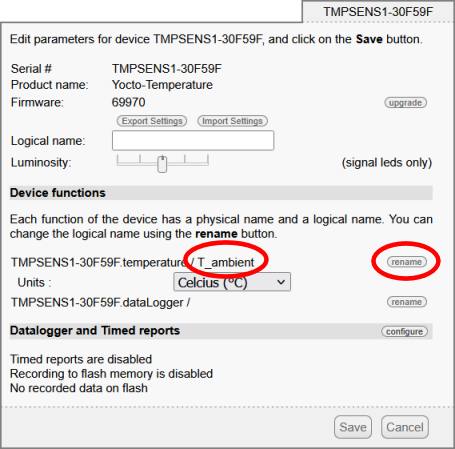
Configuring a logical name with VirtualHub
Or, if you're setting up systems in an assembly line, you can also write a small tool that pre-configures your modules each time you present one to it. Here is a very simplified example that automatically assigns the logical name "T_ambient" to the temperature function of every Yocto-Temperature(-C) that is connected to the machine running it. Note that this code is intentionally tied to the model name.
from yoctolib.yocto_api import YRefParam, YAPI, YModule
from yoctolib.yocto_temperature import YTemperature
def arrival(m:YModule):
if m.get_productName().startswith("Yocto-Temperature"):
serial: str = m.get_serialNumber()
feat: YTemperature = YTemperature.FindTemperature(serial + ".temperature")
feat.set_logicalName("T_ambient")
m.saveToFlash()
errmsg = YRefParam()
if YAPI.RegisterHub("localhost", errmsg) != YAPI.SUCCESS:
sys.exit("RegisterHub failed: " + errmsg.value)
YAPI.RegisterDeviceArrivalCallback(arrival)
while True:
YAPI.UpdateDeviceList()
YAPI.Sleep(100)
Once a module is properly configured, the code to retrieve your functions becomes straightforward
if not sensor.isOnline(): sys.exit("Temperature sensor offline")
print("Temperature = %2.1f %s" % (sensor.get_currentValue(), sensor.get_unit()))
Make your code future-proof
In conclusion, we cannot emphasize enough how important it is to write code that anticipates the future. This is particularly important if you're writing software that will be sold to customers who won't be able to modify and recompile it if a problem arises. Finally, we'd like to emphasize that while this issue has been exacerbated by the arrival of USB-C versions, it is not a new one. Yoctopuce releases new versions of its products fairly regularly, either because there was an opportunity to improve performance or because certain key components were no longer available. Yoctopuce has always ensured that these new versions are compatible with older ones, but the "problem" of module names and identifiers mismatch was already there.