When we release a new product, it always takes some time for users who need it to discover it, via the Internet. So, a month after the release of the Yocto-Spectral and Yocto-Spectral-C, we are starting to receive the first, very positive, feedback. But to our surprise, at this time, the product's most frequent use case was not the one we had anticipated...
When we designed the Yocto-Spectral, we were primarily concerned with the problem of color recognition, both in reflection (on a passive surface) and in emission (on a light-emitting surface, eg. a display). That's why we included predictive models and automatic settings adapted to this application.
However, our first users are more interested in measuring the intensity of the different bandwidths of the light spectrum coming from external sources, whose intensity can vary much more than on a display, for example. So we're going to give you some pointers on how to set the measuring parameters in expert mode.
Furthermore, rather than performing a global calibration in relation to white, as is done for color recognition, it is more useful for this application to proceed bandwidth by bandwidth, in order to give each bandwidth a corresponding physical quantity, such as cm2 energy, for example. We'll also show you the steps to follow.
Expert mode settings for a light source
When you click on the Yocto-Spectral in the web interface of VirtualHub, you get a list of the measured values for each spectral channel. If, even occasionally, a saturation message appears in red below the channel list, you probably need to set your sensor to Expert mode, as this means that at least one of the channels is saturated and can no longer correctly indicate the measured value.
The Yocto-Spectral can announce two types of saturation: analog saturation and digital saturation. This is due to the way the spectrum sensor is designed:
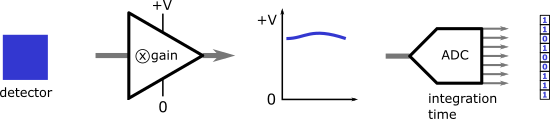
If the analog amplifier goes outside the expected electrical range, the signal is truncated: this is analog saturation. The only way to avoid this is to reduce the gain of the analog amplifier.
The analog-to-digital converter transcribes the analog signal into pulses counted per time unit. If the number of pulses is greater than the digital representation allows, the measure is also truncated: this is digital saturation. This can be avoided either by reducing the analog signal through gain, or by reducing the integration time.
It's easy enough to identify the channel at the origin of digital saturation: it's bound to be the one with a raw count approaching 65,000. On the other hand, the only way to identify which channel is at the origin of analog saturation is to increase the amplitude of the light source and find out which channel is not increasing.
To optimize your sensor settings, choose parameters that never saturate, even under the most intense illumination conditions. This will ensure proportionality of measures under all conditions. Finally, don't forget that the changes you make in the display window are for experimentation only. To save settings in the module's flash memory, apply them in the module's configuration window and press the Save button.
Calibrating SpectralChannel functions
Each SpectralChannel of the Yocto-Spectral is considered a sensor in its own right. You can therefore use the procedure described in this previous post to define a transformation (calibration) between the value read by the sensor and the value announced by the SpectralChannel function. You can even use our little interactive tool to generate the commands needed to perform the calibration from the measured values. You can select in the tool whether the commands are to be integrated into your software, or launched in a shell window.
For the raw value, be sure to use the raw measure announced in the rawValue attribute of the SpectralChannel function, and not the rawCount attribute: the latter corresponds to the internal value of the analog/digital converter, but before application of the scaling factor to take into account gain and integration time. Calibration, on the other hand, is based on the rescaled value, so you don't necessarily have to redo it if gain or integration time changes.
If you calibrate each channel using a light source of known intensity, you can set the theoretical expected irradiance value as the reference value. In this way, you can teach your sensor to measure irradiance in the unit of your choice. For a list of the wavelengths covered by each channel, please refer to the Yocto-Spectral documentation.
Be aware that the sensitivity of the AS7343 sensor used by the Yocto-Spectral may vary from one sensor to another. It is therefore important to repeat the calibration for each module individually, if you want to obtain reproducible measures, and then save the calibration in the module's flash memory. This is what we do at the factory, so that the modules we sell all behave in much the same way when it comes to color recognition.
Finally, don't expect the Yocto-Spectral, which sells for around EUR 60, to deliver the same results as a genuine EUR 6,000 spectrometer. The little AMS sensor it uses may be pretty clever, but it's still a small chip with limitations...