 If you've launched VirtualHub on the latest versions of macOS, you will have noticed that the OS refuses to start the application, as it considers it "potentially dangerous". Spoiler alert, this is not the case. This week, we explain why this message appears and how to launch VirtualHub on macOS.
When you launch VirtualHub or any other Yoctopuce application on macOS Sequoia, you may get the following message:
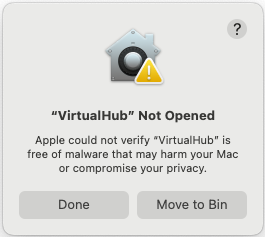
First error message
This message indicates that macOS cannot verify the source of the application and therefore refuses to run it. To run it, you need to add an exception in macOS settings.
To do this, open macOS settings (Apple → System settings) and open the "Privacy & Security" panel. If you scroll down to the bottom of this panel, there's a "Security" section which lists all the applications that are blocked by the OS.
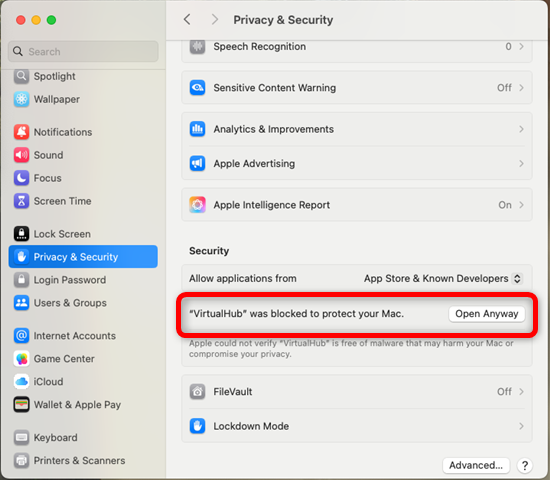
The Privacy & Security section enables you to accept VirtualHub
You need to click on the "Open Anyway" button for the application that is blocked, which opens another pop-up with the same warning, but with an additional "Open Anyway" button.
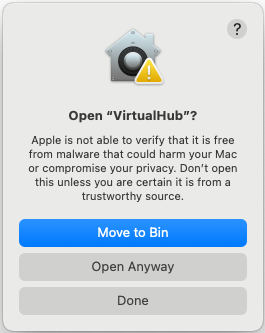
The second pop-up
After clicking on this new button you are first asked for the password and then you can add an exception for the application. Once these steps have been completed, you can finally run VirtualHub normally.
The SSH trap
If you're using your Mac as a server and interacting with it via an SSH terminal, the situation is even less intuitive. The OS blocks the execution of the application without displaying any error message on the terminal.

If you launch VirtualHub via SSH, no error message is displayed.
macOS makes no distinction between an application launched from a local terminal or an SSH session. As a result, the application remains blocked (with no error displayed in the terminal), while the warning window only appears on the machine screen. To unblock this situation, either physically connect to the machine, or connect via VNC and follow the procedure described above.
Why is this?
Why is VirtualHub considered suspicious by macOS? Quite simply because we're not a member of the Apple Developer Program.
When you launch an application, macOS uses Gatekeeper to check the application's digital signature and to detect whether it has been modified by a malicious person. The idea is commendable, and Microsoft does more or less the same thing. But where Microsoft uses digital certificates issued by authorities such as DigiCert or Sectigo, Apple only recognizes its own certificates.
So, to sign an application so that it is not considered suspect, it is imperative to have an Apple developer account and to have it validated using Apple tools.
You're probably wondering why we don't have an Apple developer account.
To become an Apple developer, you need a DUNS (Data Universal Numbering System) number. The DUNS number is used to identify and profile companies and their business information worldwide. As we explained in a previous post, we don't want to hand over control of our public information to a private company abroad.
What's more, Apple developer status is not free and must be renewed every year. More than the cost of this subscription, we don't like the fact that our applications depend on a third-party service that can decide to block our software at any time.
We firmly believe in developer independence, and we try to rely as little as possible on third-party services to build and publish our products. That's why we've been distributing our applications and source code independently on our web site since Yoctopuce was founded 15 years ago. It's also why VirtualHub is not published on the Apple store or the Microsoft store. Unfortunately for our users, this means they'll have to continue applying the procedure described above for future versions of our applications.