 Since the release of the Yocto-Spectral and Yocto-Spectral-C, several people have been able to get their hands on this module, which enables color recognition and a measure of the light spectrum in the visible and near-infrared range. We were quickly asked if it would be possible to add an AutoGain mode, to automatically adjust gain as a function of brightness, in order to increase the dynamic range of usable measures.
When we designed the module, we spent a lot of time perfecting color prediction, but a little less on exploiting the spectra themselves. As a result, we had missed out on the automatic gain control functionality, which is more useful when measuring ambient illumination. But this omission is now remedied, and the new AutoGain mode is easily available via a simple software update. Let's see how to set it up.
Auto gain
The AutoGain mode allows you to automate spectral measures when there are wide variations in light intensity, without risking saturation and guaranteeing consistent values. The principle is simple:
- choose a reference channel on which to base gain control;
- define a minimum and maximum raw value threshold on this channel;
- the module automatically adjusts the gain to keep the measures within this range:
- when the read value exceeds the maximum threshold, the gain decreases
- when the read value falls below the minimum threshold, the gain increases
The threshold values used for gain control are raw values, i.e. not normalized by gain or integration time. Be careful not to set thresholds too close to one another: otherwise, AutoGain may modify the gain at each measure, as the value read will never remain stable between the two thresholds.
We've also added an additional option: automatic gain reduction in the event of saturation detected by the sensor, regardless of the channel concerned. This setting has the advantage of ensuring that no channel in the spectrum is saturated, but as the gain is global for all channels, it can lead to very low gain due to saturation of a single channel.
Configuration
To simplify configuration, the interface displayed in VirtualHub has been updated with an intuitive interface for easy setting of AutoGain.
To determine the ideal configuration, we advise you to carry out tests directly in the Yocto-Spectral test interface, then save the settings on the module's configuration page. The configuration interface of the Yocto-Spectral has also been adapted for the new parameters.
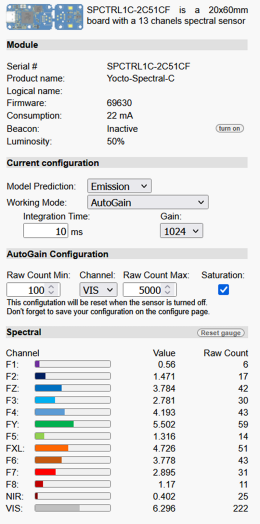
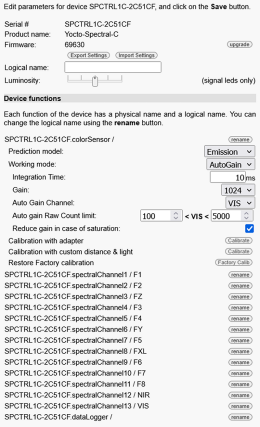
Updated interfaces for the Yocto-Spectral and the Yocto-Spectral-C
In AutoGain mode, both integration time and gain can be selected. However, only the gain is immediately adjusted if the value read exceeds the set thresholds (or if saturation is detected, provided that gain change in case of saturation is enabled).
A new method has also been added to the YColorSensor class:
Parameters :
- channel(string): name of reference channel used for gain control.
- minRaw(int): minimum raw value threshold before gain increase.
- maxRaw(int): maximum raw value threshold before gain reduction.
- noSatur(bool): activates gain reduction if saturation is detected.
If any of these parameters are invalid, the function ignores them. If the channel name indicated does not correspond to a valid channel for the sensor, AutoGain is applied to the VIS channel.
This function does not automatically save the configuration: you should therefore remember to call saveToFlash() so that the settings are retained after the module has been powered down.
Conclusion
AutoGain mode is very useful for spectrum measures on highly variable light sources or outdoors over long periods of time. It ensures the continuity and validity of the measured values, even when light intensity suddenly changes from very low to very high levels.