 A few weeks ago, we built a system to measure the SAG of a bike's suspension, and we teased you with the promise of an improved version of the software. A promise is a promise: this week, we've created a graphical version of the app. To do this, we used the Python Arcade Library.
We really like the Python language. It's simple, relatively efficient, and works on almost any OS or platform. In short, it's our go-to language when we need to build a small application.
Python does have one weakness, however: it isn't designed for building graphical applications. There are a few solutions like Tkinter, but they're a far cry from native applications like the ones you could build with Visual Studio or Xcode. Among these solutions, there's one we wanted to try: the Python Arcade Library.
As the name suggests, the "Python Arcade Library" is a graphics library designed for creating 2D games. It's a mini game engine that supports sprites, animations, collisions, and more. But what's interesting is that this library works on Windows, Linux, and macOS.
So we wanted to see if this library could be used to develop small Python applications.
Installation
Just like our library, the Arcade Library is available on PyPi and is super easy to install.
pip install arcade
Code
We grouped all the code that interacts with the Yoctopuce library into a single ApplicationConfig class. The setup method initializes the library and lists the Yocto-RangeFinders connected to the USB ports. If USB port access fails, we try to use VirtualHub (127.0.0.1).
The second method, check_parameters, is called by the application after the user has selected which Yocto-RangeFinder to use and entered the suspension travel.
Note that the Yocto-RangeFinders are configured in high-precision mode and associated with a SuspStatus object, which is a simple object that allows you to calculate the SAG based on the current value (see "Adjusting your suspensions with a Yocto-RangeFinder"). Using callbacks allows you to retrieve the measured value efficiently (see "Polling vs. Callback") and avoid slowing down the GUI.
def __init__(self):
self.url = "usb"
self.error = ""
self.all_rf = []
self.front_selection = "None"
self.rear_selection = "None"
self.front_rf = None
self.rear_rf = None
self.front_travel = 160
self.rear_travel = 75
self.front = SuspStatus(self.front_travel)
self.rear = SuspStatus(self.rear_travel)
def setup(self) -> None:
errmsg = YRefParam()
if YAPI.RegisterHub(self.url, errmsg) != YAPI.SUCCESS:
self.error = errmsg.value
self.url = "127.0.0.1"
if YAPI.RegisterHub(self.url, errmsg) != YAPI.SUCCESS:
return self.error
rf: YRangeFinder = YRangeFinder.FirstRangeFinder()
while rf is not None:
self.all_rf.append(rf.get_hardwareId())
if len(self.all_rf) == 0:
self.error = "No Yocto-RangeFinder detected on " + self.url
return self.error
return ""
def check_parameters(self, fr_hwid, fr_travel, rd_hwid], rd_travel):
self.front_travel = int(fr_travel)
self.rear_travel = int(rd_travel)
if fr_hwid == "None" and rd_hwid == "None":
return "You need to select at least one Yocto-RangeFinder device"
self.front = SuspStatus(self.front_travel)
self.rear = SuspStatus(self.rear_travel)
if fr_hwid != "None":
self.front_rf = YRangeFinder.FindRangeFinder(fr_hwid)
self.front_rf.set_rangeFinderMode(
YRangeFinder.RANGEFINDERMODE_HIGH_ACCURACY)
self.front_rf.set_userData(self.front)
self.front_rf.registerValueCallback(valueCallback)
if rd_hwid != "None":
self.rear_rf = YRangeFinder.FindRangeFinder(rd_hwid)
self.rear_rf.set_rangeFinderMode(
YRangeFinder.RANGEFINDERMODE_HIGH_ACCURACY)
self.rear_rf.set_userData(self.rear)
self.rear_rf.registerValueCallback(valueCallback)
return ""
Interface
For the interface, we have two views: ConfigurationView and AppView.
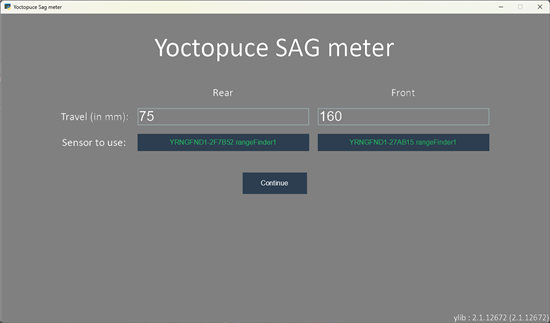
The first allows the user to choose which Yocto-RangeFinder to use and to set the fork and shock absorber travel.
The configuration panel
This view uses a UIManager to manage interactive elements, such as dropdown menus (UIDropdown) and text fields (UIInputText). When the Continue button is pressed, we call the check_parameters method we saw earlier and switch to the AppView.
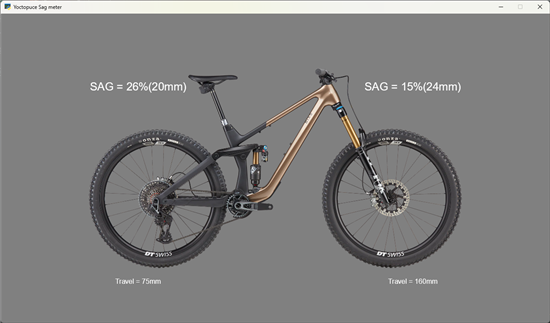
The AppView displays the bike sprite in the center and four text fields.
The application
The text fields displaying the SAG are updated in the on_update function. This method is automatically called by the Python Arcade Library every time the screen is refreshed. It is therefore important for the code to be efficient.
We call YAPI.HandleEvents(), which calls the callback we registered with the latest values from the Yocto-RangeFinders. The callback calculates the SAG and updates the SuspStatus object. Next, we update the two text fields with the SAG we just calculated.
YAPI.HandleEvents()
self.front_sag_text.text = self.param.front.get_sag_text()
self.rear_sag_text.text = self.param.rear.get_sag_text()
The code for this application has been added to the GitHub repository of the first post, available at the following address: https://github.com/yoctopuce-examples/y_suspension_sag
Conclusion
After completing this project, what do we think of the Python Arcade library? Among its advantages is that it is fairly easy and intuitive to use. The documentation is very well done, and in a short time, you can achieve what you want. The application runs on Windows, macOS, and Linux. Finally, by using PyInstaller, you can package the entire project into a single executable file.
On the other hand, it's not really possible to build a large application using this technique. For one thing, the code will become too complex to maintain, and more importantly, the look is very distinctive and cannot be customized.
In short, this library is great if you need to quickly build a small application for a personal project, but not much more than that.